Find My found my house. Bluetooth found the pillow
My iPhone was dead somewhere in the house. Find My said Home, Now, and then refused to ring it. A passive Bluetooth scan on a laptop I carried from room to room closed the last thirty metres.
TL;DR
Find My localises to a street address. That is useless in a two-storey house. A flat iPhone still broadcasts a Bluetooth beacon, and any Mac can hear it, so a laptop carried room to room becomes the ranging instrument Find My does not give you.
120 packets over 46 minutes, five rooms, one metre of final uncertainty. The phone was under a pillow. The single thing that made it work: the beacon rotates its identifier every few minutes, so you have to track it by state, not by id.
Two facts that look like a contradiction
Find My showed the phone at my house, timestamped Now. Tapping Play Sound gave me Sound Pending, and it stayed pending.
Those two readings pull in opposite directions, and working out which one to believe took an embarrassingly long time. A live location says the phone is findable. A pending sound says nothing can reach it. Both were true at once, and the resolution is that the location and the command travel by different routes: the sound needs a network path to the phone, while the location can come from any passing Apple device that hears the phone's Bluetooth advertisement and reports it upstream.
So the phone was offline, out of battery, and still transmitting. The map fix was fresh because something nearby kept hearing it. That is the exact scenario a passive scan is good at, and it is also the scenario where the Find My app has nothing more to offer you. It had already told me everything it knew: somewhere in this building.
The building has two floors and more rooms than I wanted to search by hand.
What a passive scan can and cannot tell you
Worth being clear about the limits, because they are structural and no amount of code gets around them.
You never get a MAC address. macOS hands out a per-host UUID instead, so nothing you see can be matched against the Bluetooth address of a device you have paired. You never get attribution. Find My keys are encrypted and rotate, so no scan can tell you that a given beacon belongs to you rather than to a neighbour. You never get real distance. The advertisement carries no transmit power, so the metres figure any tool prints is a guess resting on an assumed constant.
What you do get is one genuinely useful bit. Apple's beacons come in two flavours: nearby_owner, meaning the thing is sitting with its owner's devices, and separated, meaning it is not. A lost phone is separated by definition. In a typical scan of 40 advertisers I would see a dozen Find My beacons and exactly one or two separated ones.
That is the whole trick. You cannot identify the phone, but you can filter 40 devices down to one candidate, and then you only have to answer a much easier question: is this signal getting stronger or weaker as I walk?
The walk
I carried a laptop to a room, stood still for sixty seconds, wrote down the room name, and moved on. Standing still matters more than it sounds: the scan reports the best signal seen over the whole window, so walking during a measurement smears the reading into "wherever I happened to be closest".
Five rooms, 120 packets:
| Where | Median | Best | Packets |
|---|---|---|---|
| Room A, spot 2 where it was | -55 | -50 | 30 |
| Room A, whole room | -66 | -58 | 10 |
| Room B same floor as A | -76 | -69 | 7 |
| Room C directly below Room A | -81 | -60 | 13 |
| Room D floor below, far side | -98 | -85 | 10 |
Over 30 dB between the best room and the worst, which under any plausible path loss model is a large multiple in distance. Not subtle.
Room C's best of -60 is worth pausing on, because it is wrong in an instructive way. Those strong packets arrived while I was already on my way out of it, before I had relabelled, so they are readings from somewhere else wearing Room C's name. The median, built from the packets taken while I was actually standing still down there, is unmoved at -81. This is the whole argument for the median column in one row.
Two things made the table trustworthy rather than just suggestive.
The median, not the best. A single lucky packet routinely lands 10 dB above a room's typical read. Every room I sampled longer got worse: Room B slid from -69 to -71 to -72 to -76 as packets accumulated. Room A went the other way and held. Direction of drift under more data turned out to be a better signal than any individual reading.
A fixed control. There is a Mac Studio in Room B that never moves, and it advertises too. Its signal tells you how far the laptop actually walked, which is the only reason the target column is comparable across rows:
| Where | Target | Stationary Mac |
|---|---|---|
| Room B | -76 | -55 |
| Room C | -81 | -89 |
| Room D | -98 | -96 |
Room C is the row I like. It came in 17 dB above everything else on its floor, which reads like a competing hotspot until you notice it sits directly below Room A. The shortest path from the beacon to Room C ran straight down through the ceiling. A reading that looked like a rival was actually a second, independent vote for the same answer.
The bug that would have killed it
My first tool locked onto a device id and printed a live signal meter. It worked for about ten minutes and then went quiet forever, with no error, still showing a number that would never update again.
Find My beacons rotate their key, and the identifier the OS hands you is derived from it. Across the evening I logged 7 distinct ids for what was almost certainly one emitter. Every rotation silently retires your target, and the failure mode is the worst kind: the meter looks alive.
The fix is to stop tracking an identity you were never really given. Track the strongest separated beacon instead, whatever it currently calls itself. A rotated beacon is still a separated beacon, so when the old id ages out the new one takes over on its own. That version followed 4 rotations without me noticing any of them happen.
The same idea rescued the room table. Comparing rooms means comparing readings taken ten minutes apart, which is longer than an id survives. Grouping by beacon id would have shattered the comparison into fragments. Grouping by state kept it whole.
Building the instrument while using it
The first version was a command line sweep that printed a table once a minute. That is fine for comparing rooms and useless for the endgame, because by the time you have walked to a cupboard and back the table is a minute stale. The second version was a live meter that overwrote a single terminal line, which was worse: no scrollback, so you could not compare where you were standing now against where you stood two minutes ago.
What actually worked was a small local dashboard. A scanner thread writing into a tracker, an HTTP server on loopback, and a page polling it once a second. It took about twenty minutes to write, in the middle of the hunt, and it changed the search from "read numbers and remember them" to "look at a table":
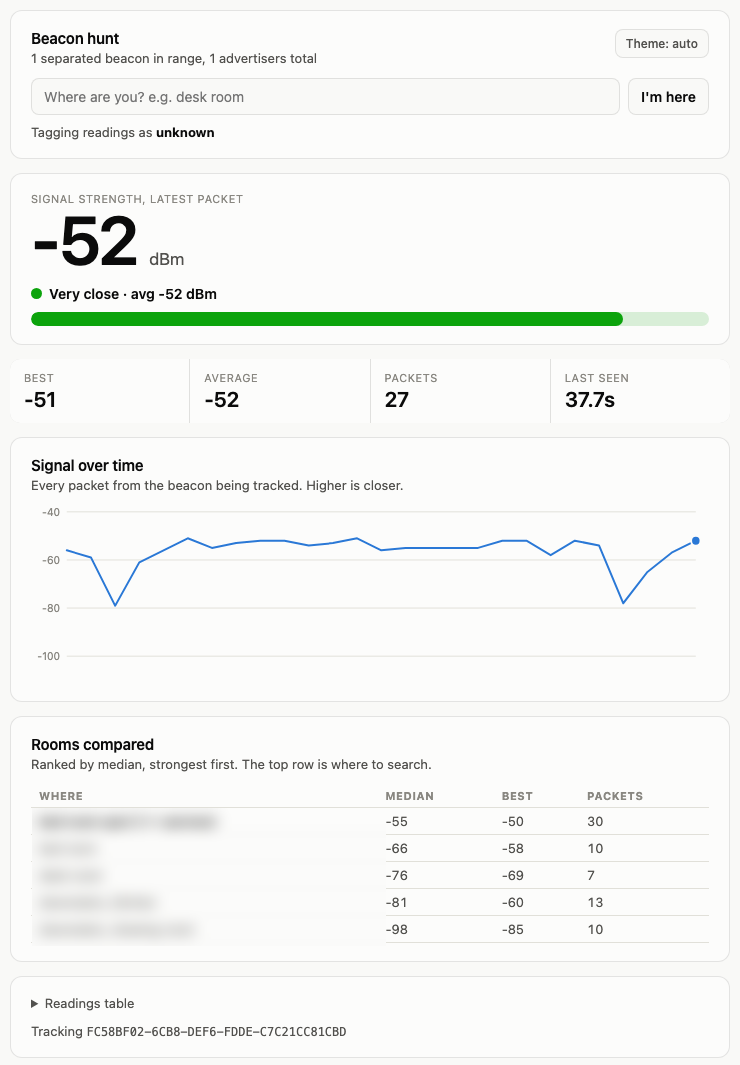
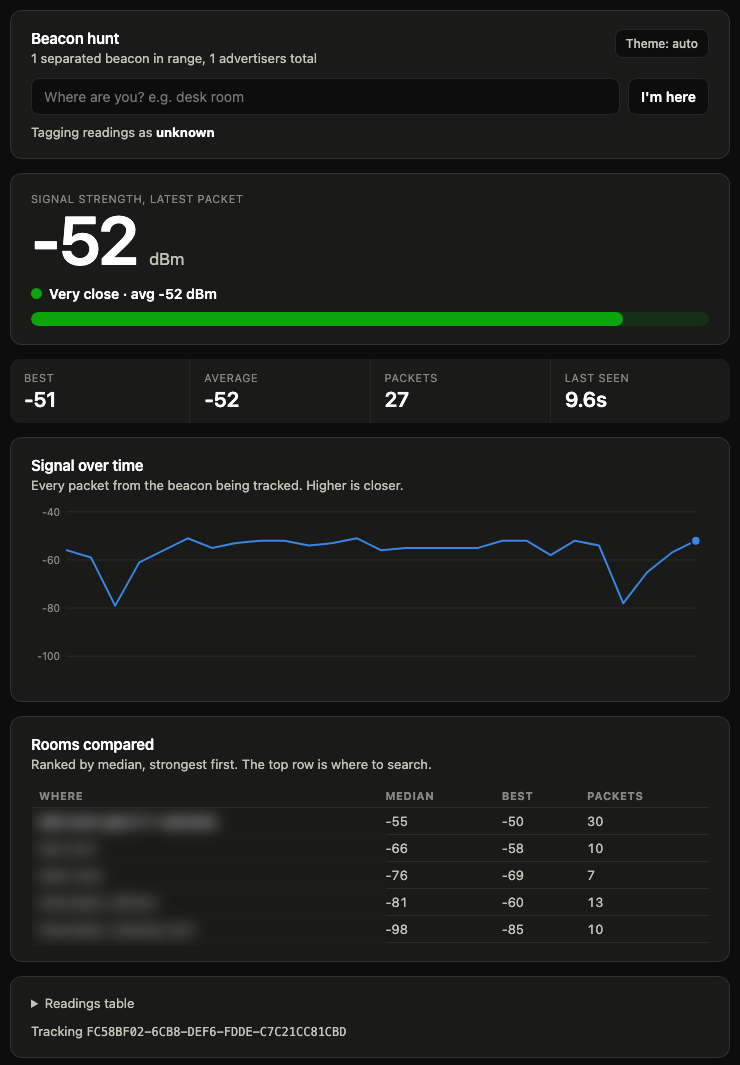
Three things earned their place. The "last seen" tile, because a frozen number is ambiguous and this beacon routinely went ninety seconds between packets: without it you cannot tell a weak signal from a dead one. Naming your location, so readings are tagged as you walk and the comparison builds itself instead of being reconstructed from memory afterwards. And the median column, ranked, with the warmest room called out, so the answer is the top row rather than something you work out.
The screenshot above is generated by replaying the saved log back through the same code, because the beacon is dead and the live page now renders an empty state forever. Adding that replay mode found a genuine bug: the page's colour tokens were scoped to a wrapper element rather than the document root, so in dark mode several elements fell back to black text on a black background. I had used it all evening in dark mode without noticing, because I was looking at the one number that happened to be styled correctly.
A watcher, and what it was actually for
I also had a job polling the dashboard every minute, with instructions to stay silent unless something specific happened: a new best for the room I was in, the ranking changing, a room's packet count crossing eight, a key rotation, or three minutes of silence.
Most of its output was the single line "no meaningful change", which is exactly right and also the point. The value was not in the reporting, it was in having written down in advance what would count as news. Deciding the thresholds while calm is very different from deciding them at half past ten at night, standing in the room you have just decided is the right one, wanting the answer to be yes. Twice it stopped me acting on a single strong packet, because eight packets was the bar and I had set that bar myself an hour earlier.
It fired usefully four times in about forty minutes. Everything else was noise, and eventually I turned it off, which is its own lesson: a monitor that has nothing left to detect is not a safety net, it is an interruption. The threshold that finally mattered was the silence one.
The iOS app I did not need
In parallel I had agents build an iPhone app for this, on the theory that a phone is easier to carry than a laptop. It came out well: SwiftUI, three screens, around 5,300 lines of Swift, 148 tests across 20 suites, clean build on the first integration attempt.
Then a review pointed out that iOS almost certainly strips Apple's own manufacturer data before handing advertisements to third party apps, citing a tracker-detection app that identifies Find My candidates by the absence of manufacturer data rather than by parsing it. If that is right, the app is blind to the one field the entire design depends on, and the proposed fallback of filtering on the Find My service UUID does not help either, because separated advertisements carry no service UUID at all. I never installed it on a device, so I cannot report this as measured fact. What I can report is that macOS hands over the full payload, the laptop already worked, and the app is still sitting there unbuilt onto any phone.
Under the pillow
Once Room A won, the same method worked at a smaller scale. I named spots instead of rooms, and one of them broke away: median -55, best -50, over 30 packets, against -66 for the room as a whole. An 11 dB step up inside a single room, with no wall available to explain it.
Then the beacon stopped. It had gone quiet for a minute or two several times that evening, so I waited. This time it did not come back. About half an hour later I found the phone at that spot, under a pillow, completely flat.
That last half hour is the part worth keeping. The answer did not need the beacon to still be alive. The measurement was already banked on disk, and searching one square metre of a known room does not require a signal. The radio had finished its job before it died.
The pillow also explains the one number that never quite fitted. Standing right next to it I was reading -55, when clear air at that range should have been considerably stronger. That gap was one layer of fabric, and it is exactly why the phone was invisible to three hand searches and obvious to a meter.
What I would keep
Filter by state, not identity. Rotating keys defeat any tool built around a device id, and they do it silently.
Always have a fixed control in the scan. One stationary emitter converts a stream of meaningless absolute numbers into a comparison you can act on.
Trust the median and the direction of drift. Rooms that got worse with more data were wrong. The room that got better was right. Best-ever readings lie.
Ignore the metres. The distance figure is a fixed formula over the signal with an assumed transmit power the advertisement never provides. It is non-linear in a way that flatters small gains at long range and hides real ones up close. Read the dBm.
And the honest caveat, which the tool printed at the bottom of every single scan: none of this ever attributed the beacon to my phone. The keys are encrypted and rotating, and that limit held all the way to the end. What I actually established is that the strongest separated beacon in the house was at a particular spot, and that my phone turned out to be at that spot. Co-location, not identification. It is the right answer, arrived at by a method that is not technically allowed to prove it.
The tools
macOS, Python, and uv for the dependencies. The dashboard is the one worth running:
uv run python ble_sweep.py sweep --duration 60   # census of every advertiser
uv run python ble_web.py # browser dashboard, port 8765Grant Bluetooth permission to the terminal you are sitting in front of. It is granted per application, and an SSH session cannot get it, which cost me twenty minutes.